Introduction (Does It Do What It Should)
I was fortunate to review two products from reMarkable, who are well-known in the business of e-paper readers. I’ve never really had a chance to review any reader that didn’t double as a tablet, but when it comes to reMarkable, I consider this kind of a gourmet reader.
Our Review of the reMarkable Paper Pro Move and Book Pad
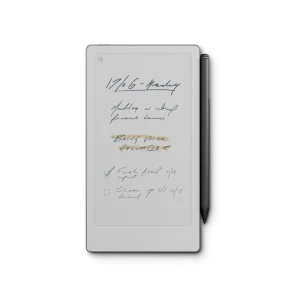 The reMarkable Paper Pro Move has a canvas color display of 7.3 inches, and it came with a marker that affixes right on the side. Once you have it all set-up, it is very easy to use that marker and shift from digital pen, marker, or highlighter. It’s also easy to open up notes on a really great natural color with soft and eye-friendly comfort, with no blue light or eye-strain.
I have to admit that I did my best to really demonstrate this on the video, and I had to use some crude tool that affixed my smartphone to my neck. I really couldn’t get a good view, and I wasn’t certain if I had downloaded what I needed here, really. I’m told this thing can convert handwriting to text, but each time I tried, I kept getting that not you get from anything digital where you need to download something first.
So, I didn’t really get a good demo of a lot of things. I hope that the pictures that I made in the list that I wrote was a good example. After all, I’m guessing this is what you use a reader for, like a little notepad that is much better than anything you can use your phone for. Also, to read things.
I mean, this thing surely has access to a lot of apps, and it is possible to share what you got. Like you can copy files to and from from Google Drive, Microsoft OneDrive, and Dropbox.
So, if you want the Paper Pro Move, it is available for about $449 on the ReMarkable website. The Book Folio cover, made with Premium Leather, costs about $149.
Our Review of the reMarkable Paper Pro and Type Pad
 Now, this is the Paper Pro, which has an 11.8-inch screen. I believe that most of the features are the same. Now, I have heard that this comes with a marker, but I’m going to have to check again to see if it wasn’t there and I just didn’t know it.
Again, I wish I had a better demonstration of it, but at least I got to put on the Type Pad. Yes, this is a Folio with a keyboard, and it just magnetically locks on, which I really like as I don’t have to use Bluetooth.
So yes, I really liked working with these e-readers, and it really allows you to use something really great, the old fashioned pen/pencil or paper. You can find it the Paper Pro on the reMarkable website for $629. The Type Folio is about $229.
Facts About The Company
You know what, I think I’m just going to recommend you go to the reMarkable website and just look up the company’s history. I like the original founder’s vision for this, enjoying the old aesthetic of paper and realizing they could be taken to a next level.
What Does This Company Make?
These two readers are just one of the two products that I have reviewed, and there is one more, but I’m sure they made more before this, and will make more.
Just the Specs, Man
Specs of the reMarkable Paper Pro Move
Hardware
Size and weight
195.6 x 107.8 x 6.5 mm (7.7 x 4.24 x 0.26 inches)
Approximately 230 g (0.51 lb)
Display
Canvas Color display (based on E Ink Gallery™ 3)
7.3” (16:9 aspect ratio)
1696 x 954 resolution (264 pixels per inch)
Palm rejection
Adjustable reading light
Processor
1.7 GHz Dual Core Cortex-A55
Storage and RAM
2 GB LPDDR4x RAM
64 GB internal storage
Battery
Built-in rechargeable (Li-ion) battery
USB-C charging
2,334 mAh
Connectivity
Wi-Fi 2.4 GHz and 5 GHz USB-C port
Auto wake/sleep
Sensors detect when a folio is open or closed
Software
Operating system
reMarkable OS (a custom, Linux-based operating system for digital paper displays)
Document support
PDF, EPUB (importing)
PDF, PNG, SVG (exporting)
Menu language
English
German
Handwriting conversion
Feature powered by MyScript
Apps and extensions
reMarkable apps available for macOS, Windows, iOS, and Android
Read on reMarkable extensions available for Google Chrome and Microsoft Office
Connect
Get exclusive templates, store all your work in the cloud, and edit from your phone or laptop with a Connect subscription
Security
Data encryption on device, at rest, and in transit
Multifactor authentication
Secure boot
Developer mode
Optional passcode
Device locks automatically after 20 minutes of inactivity
Cloud storage
Sync files with the reMarkable cloud. Upgrade to unlimited cloud storage with Connect
Specs of the reMarkable Paper Pro Move
Hardware
Size and weight
274.1 x 196.6 x 5.1 mm (10.8 x 7.8 x 0.20 inches)
Approximately 525 g (1.16 lb)
Display
Canvas Color display (based on E Ink Gallery™ 3)
11.8” (4:3 aspect ratio)
2160 x 1620 resolution (229 pixels per inch)
Palm rejection
Adjustable reading light
Processor
1.8 GHz quad-core Cortex-A53
Storage and RAM
2 GB LPDDR4 RAM
64 GB internal storage
Battery
Built-in rechargeable (Li-ion) battery
USB-C charging
5,030 mAh
Connectivity
Wi-Fi 2.4 GHz and 5 GHz
USB-C port
Accessory port
Auto-wake/sleep
Sensors detect when a folio is open or closed
Software
Operating system
reMarkable OS (a custom, Linux-based operating system for digital paper displays)
Document support
PDF, EPUB (importing)
PDF, PNG, SVG (exporting)
Menu language
English
German
Handwriting conversion
Feature powered by MyScript
Apps and extensions
reMarkable apps available for macOS, Windows, iOS, and Android
Read on reMarkable extensions available for Google Chrome and Microsoft Office
Cloud storage
Sync files with the reMarkable cloud. Upgrade to unlimited cloud storage with Connect
Connect
Enjoy unlimited cloud storage, automatic sync, creating and editing in our apps, extra protection for your paper tablet, and exclusive offers.
Security
Data encryption on device, at rest, and in transit
Multifactor authentication
Secure boot
Developer mode
Optional passcode
Device locks automatically after 20 minutes of inactivity
Okay, Get To The Unboxing Already!
Maybe I Want It, But Is There Anything Else Like It? Maybe For A Lower Price? Please?
Since this is my first time reviewing something with e-paper, I’m going to say that there are many like it. I’m guessing that the reMarkable is one of the more expensive ones.
Leave a Reply